

When it comes to Office 365 migrations, having the right software can make a world of difference. After trying several tools over the years, EdbMails has become my go-to solution. With a user-friendly interface, powerful features, and a seamless migration process, EdbMails Office 365 migration software has earned my #1 recommendation for email migration. Let me walk you through why EdbMails stands out in this highly competitive niche.
EdbMails Office 365 Migration Tool Review Summary
EdbMails is designed to simplify Office 365 migrations with a focus on speed, security, and reliability. The software supports a wide range of migration scenarios, including Office 365 to Office 365, Office 365 to Exchange, and more. From my experience, EdbMails shines due to its ease of use, automatic mailbox mapping, and detailed reports that ensure every step of the migration is transparent.
Whether you’re migrating just a few mailboxes or handling larger enterprise-level migrations, EdbMails ensures that the entire process is smooth and risk-free. What sets this software apart is its capability to preserve folder hierarchy, email metadata, and mailbox integrity.
EdbMails Office 365 Migration Software Benefits
- Ease of Use: One of the most important benefits is its intuitive user interface, which makes it easy for even non-technical users to operate. With step-by-step guidance, you can complete migrations without any hiccups.
- Speed and Efficiency: Time is critical in migrations. EdbMails is engineered to maintain zero downtime during migration, offering high-speed data transfers using concurrent migration mechanisms without risking data loss or corruption.
- Secure Migrations: Security is a top priority during email migrations. EdbMails ensures data encryption at every stage, giving you peace of mind that your data remains protected.
- Zero Data Loss: The software ensures that all your emails, calendars, contacts, and attachments are transferred accurately, with zero data loss.
- Free Support and Lifetime Updates: Unlike other tools that charge for updates and support, EdbMails offers lifetime free updates and 24/7 support, which adds excellent value.
Top Features of the EdbMails Software
- Automatic Throttling Management: EdbMails automatically manages Microsoft’s throttling limits, ensuring smooth migrations without delays, especially for large mailboxes.
- Advanced Filters: Selectively migrate emails using filters based on date range, sender, and recipient, ensuring only essential data is transferred.
- Mailbox Mapping: Automatically maps source to target mailboxes, reducing manual effort and time during large-scale migrations.
- Detailed Reports: EdbMails generates comprehensive reports, allowing easy verification of migrated data.
- Multiple Migration Types: Supports public folder, shared mailbox, archive mailbox, and Office 365 group mailbox migrations.
- Easy Configuration of Source and Target Office 365 Servers: Simplified setup for Office 365 servers, allowing users to configure migration settings with minimal steps.
- Incremental Migration: Migrates only new or updated items after the initial migration, saving time and avoiding duplicates.
- Concurrent Migration: Multiple mailboxes can be migrated simultaneously, speeding up the overall migration process.
- Pause or Resume Migration Option: Easily pause and resume migrations as needed, adding flexibility to the process.
- Batch Migration Support: Migrate multiple mailboxes in one batch, simplifying large-scale migrations and reducing management effort.
- CSV-Based Mailbox Import: Import bulk mailboxes using a CSV file, streamlining the migration process for large organizations.
- Office 365 Group Mailbox Migration: Seamlessly migrate Office 365 group mailboxes along with regular and shared mailboxes.
Microsoft 365 Migration Scenarios
EdbMails handles various Office 365 migration scenarios, including:
- Office 365 to Office 365 migration
- Office 365 to Exchange Server Migration
- Office 365 to IMAP Migration
- Office 365 to PST Export
- Bulk PST files restore to Office 365
- Public Folder to Office 365 migration
- Archive Mailbox to Office 365 Migration
- Tenant to Tenant Migration
No matter what type of migration you are working on, EdbMails ensures that the process is quick and seamless with minimal downtime and interruption.
EdbMails’ Awards and Quality Certificates
EdbMails has received several awards for its innovation and high-quality service in the email migration space. It is certified by Microsoft and recognized for its GDPR compliance, ensuring users that their data is handled securely. These certifications reinforce the credibility of EdbMails, making it a trusted choice for businesses of all sizes.

EdbMails Office 365 Migration Software Pricing and Plans
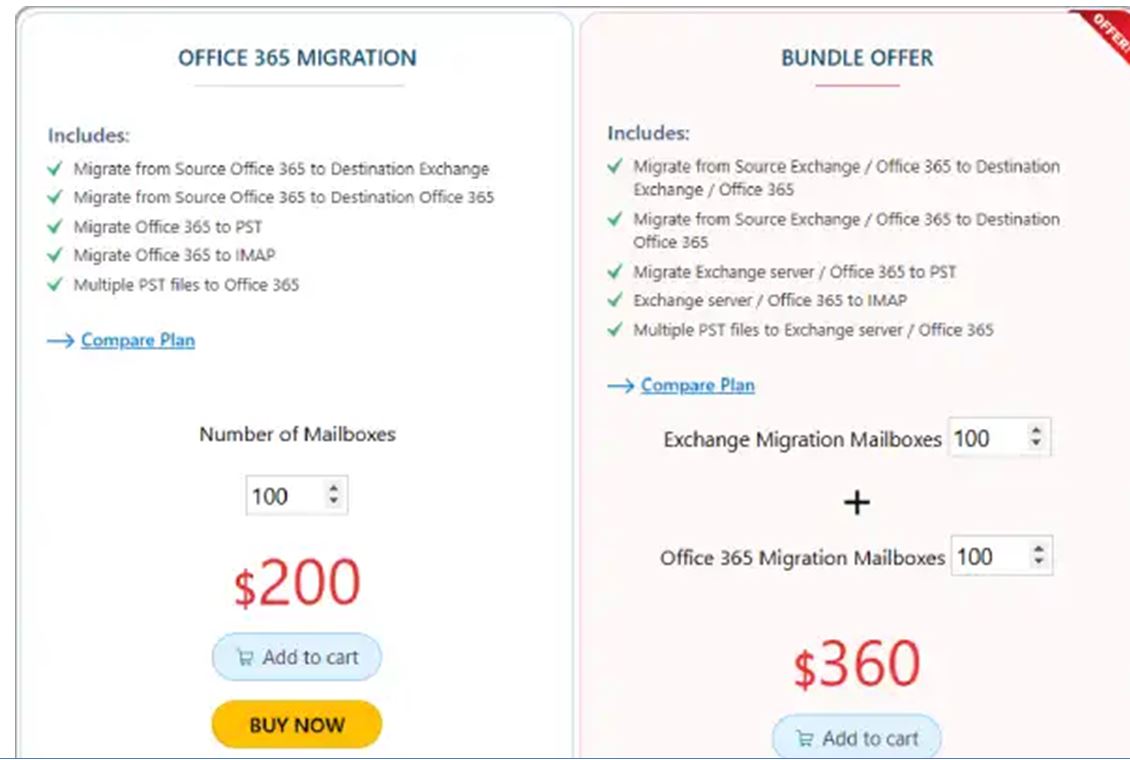
EdbMails offers flexible pricing plans to cater to different business needs. Below are the current pricing options:
EdbMails free plan: This plan allows you to test the software by migrating up to 30 items per folder for free. It’s a great way to explore its features without any financial commitment.
EdbMails pro plan: Designed for businesses that need multiple mailbox migration with access to all premium features. This plan is ideal for organizations with significant migration requirements.
EdbMails bundle offer plan: This comprehensive bundle includes whole Office 365 migration in a single package. It’s the best value for businesses looking for multiple migration solutions at a discounted rate.
How to Use EdbMails Software: Video Tutorial
EdbMails has a straightforward installation and migration process. Their official website offers video tutorials that guide users through the steps, from setting up the software to initiating the migration. These tutorials are invaluable for those unfamiliar with migration tools or looking for a quick start. I found the tutorial clear and concise, making my first migration using EdbMails a breeze.
Technical Details
EdbMails supports all versions of Office 365 and Exchange, ensuring compatibility with your system. It also works on Windows 10 and above, requiring minimal system resources. The software can handle large-scale migrations with thousands of mailboxes, and it is optimized for high performance on modern hardware.
Some technical specs include:
- Supported platforms: Office 365, Exchange Server, PST files, and IMAP
- OS compatibility: Windows 10, Windows Server 2019, 2016, 2010, 2009, and 2007
- Mailbox size limit: No limit on mailbox size
- Data encryption: AES 256-bit encryption during migration
- Pricing model: One-time payment with lifetime licenses
- Customer types: Small business, large enterprises, Medium business.
Support Details
✔ 24/7 customer support via email and live chat.
✔ Responsive and knowledgeable support team.
✔ Assistance for both technical and non-technical queries.
✔ Free lifetime software updates.
✔ Always up-to-date with the latest Microsoft updates and changes.
Conclusion
In summary, EdbMails Office 365 Migration Software is my top recommendation for anyone looking to perform secure, fast, and reliable Office 365 migrations. With its user-friendly interface, robust feature set, and flexible pricing, EdbMails is the perfect solution for businesses of all sizes. If you’re planning an Office 365 migration, EdbMails is a tool you can trust to get the job done without any hassle.
